I've worked on the creative side of marketing for the technology industry, having served as a creative director and graphic/visual-designer , and motion-designer .
I've done work for some of the biggest companies in the world, for agencies, and for startups, delivering B2B and B2C initiatives across long- and short-term project cycles. I know how to work with the unique structure of enterprise companies and the agencies that support them.
Product design to streamline creating, sending and managing invoices.

Wireframing a fiction writer’s app to accurately scope work for a development bid.
Wireframing and prototyping mobile subscriber account management.
Prototyping proof of concept for extending a proprietary security technology.
Identify friction points in an web based invoicing/billing application already in development.
Refine application design to create a more consistent and streamlined user experience without trampling on existing development efforts.
Revised workflows, refined UI design, and designed a style-guide that is helping to focus visual design and development efforts.
The initial audit revealed a disjointed application flow with unnecessary user options resulting in an un-focused and confusing user-experience that didn’t guide the user through tasks.
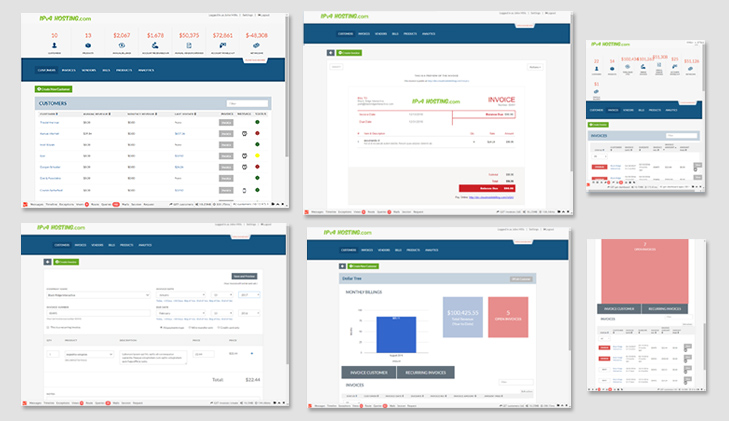
The absence of an established color palette resulted in clashing and alarming color schemes; navigation and type hierarchies weren’t clearly established; and charts and graphs lacked design coherence.
There was also a lot of wasted space with overly large top and bottom margins around the persistent navigation. Empty space allows the eye to rest, but there is an appropriate balance in order to optimize for on-screen content.
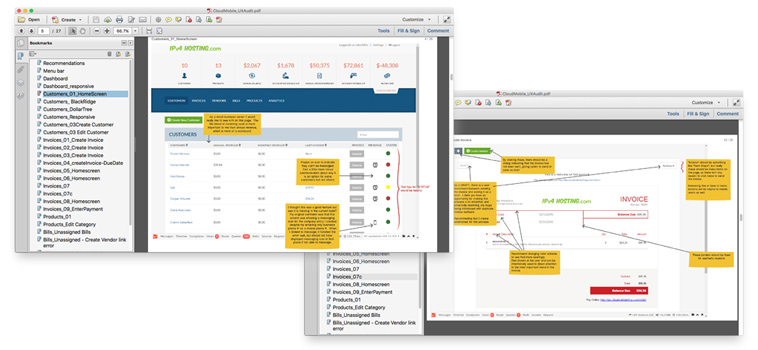
I found the invoicing functionality particularly disjointed and recommended wire-framing the section to refine the application’s design. This was a difficult sell, and one that I was unable to convince was necessary. There was a sense that existing development efforts needed to be protected and that re-wireframing was putting them in jeopardy.
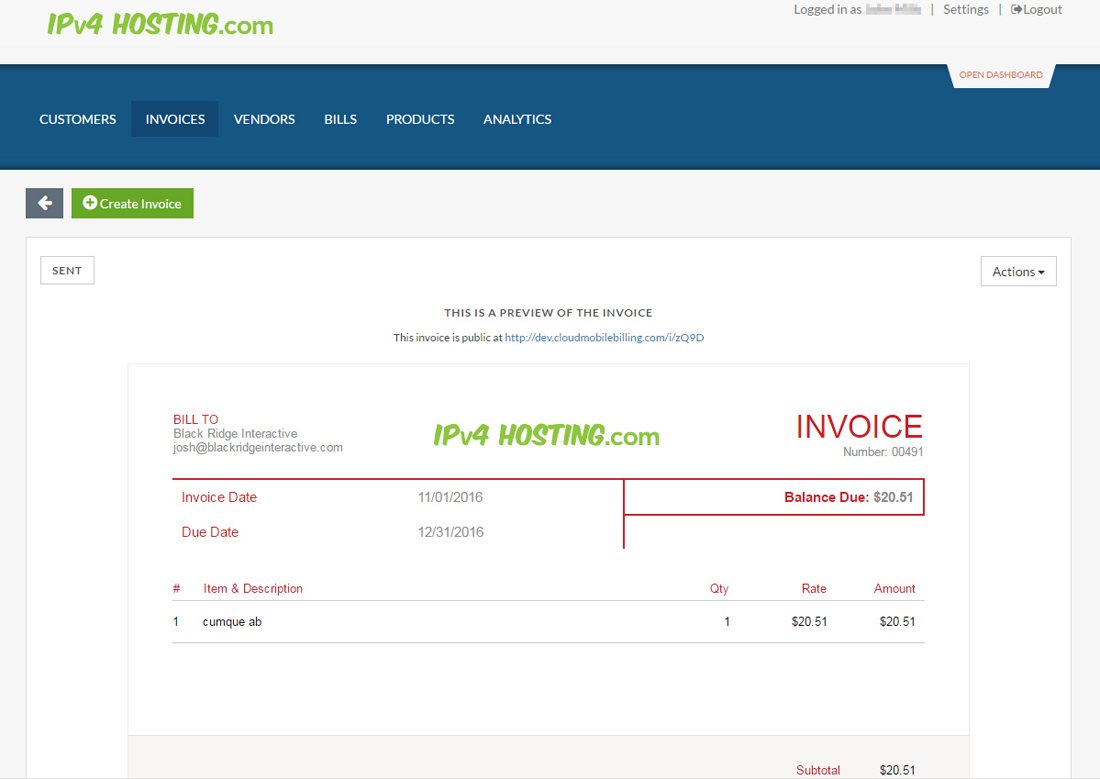
A primary application feature is creating, sending and managing invoices.
Rather than re-wireframe, I created some high-res comps to help guide the changes that I felt were necessary. This was a proactive step to avoid confrontation around what I saw as an essential step for the success of the application's usability.
First, custom responsive invoice templates were requested.
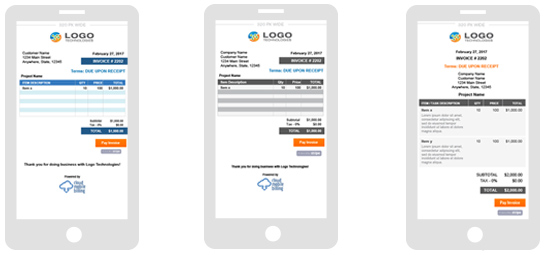
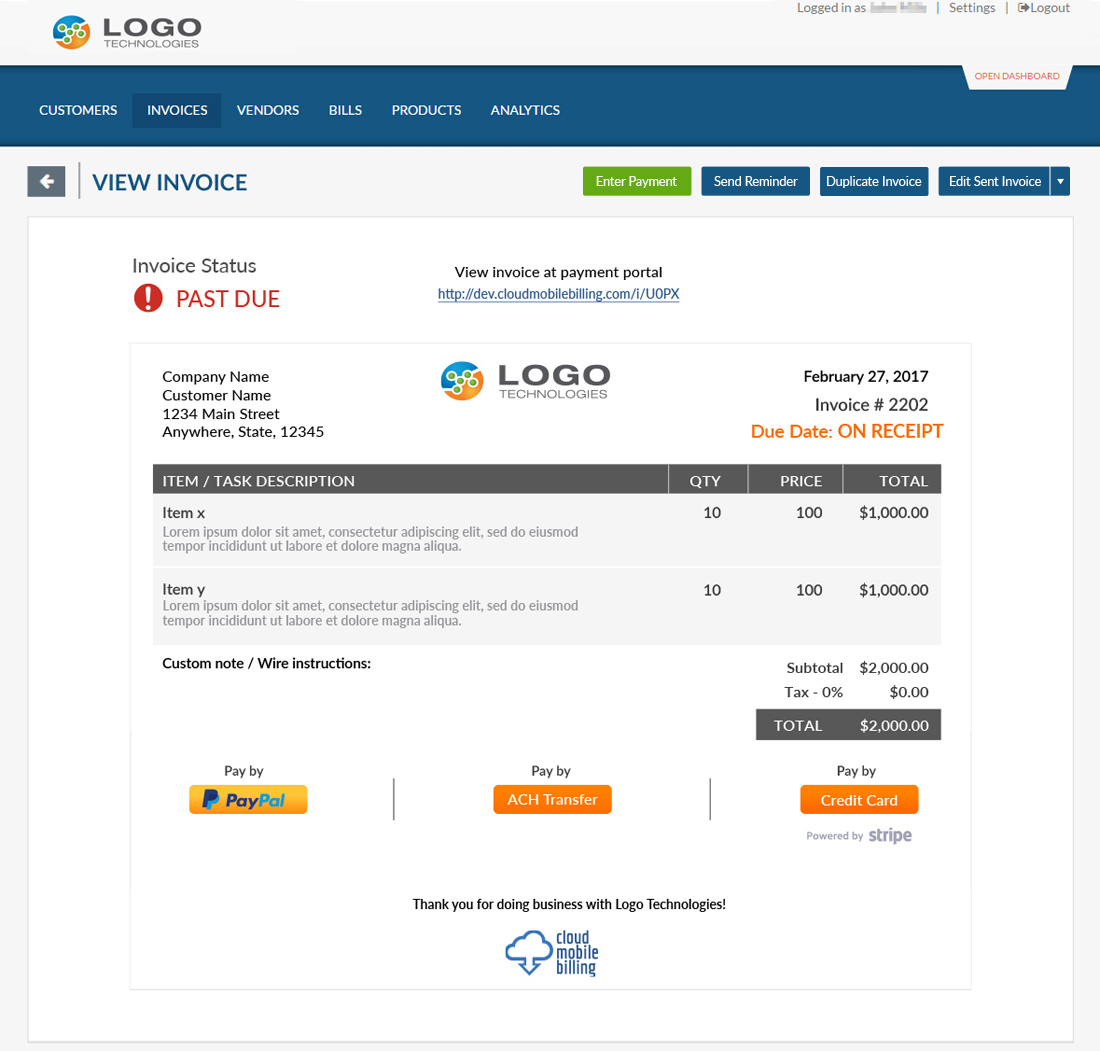
With new templates chosen, I extended one into design-comps to support the case for changes I was seeking in the invoicing section. This decision was based on the perceived pace of development and recognizing there was still an opportunity to impact the design without needing to over-assert my opinion in the presence of resistance around the recommended wireframing exercise.
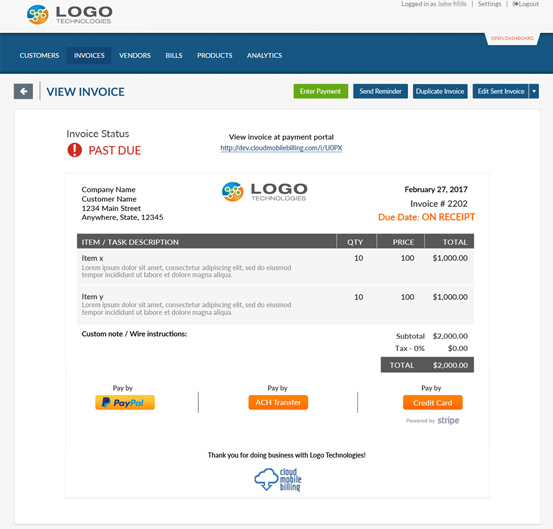
The user should now recognize they are viewing a sent invoice, not a draft, and that the invoice is Past Due. The actions for the invoice are available at a glance and visually tied to the actionable hierarchy layer.
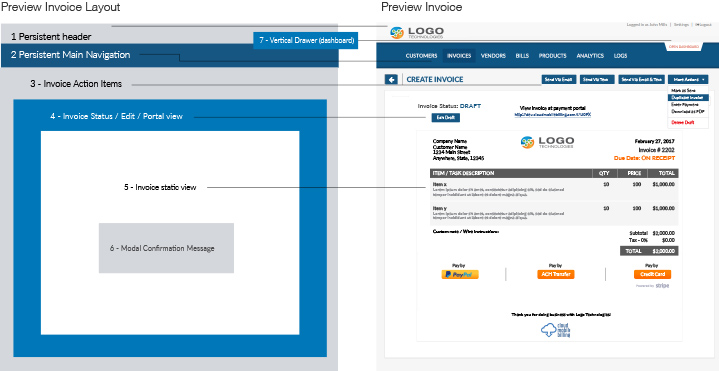
With a design-comp it was easier to make the case for the layout changes I was advocating. The design-comp served as the starting point for re-raising discussion about a perceived issue.

A set of more visual “invoice state” indicators were also created to replace the original understated grey "status" indicators that could have been easily mistaken for a button(s).
To ensure I understood the invoice system, I created a high-level diagram to communicate with the client my understanding of the MMS, Email, Invoice Portal, and PDF features and functions being utilized by the system.
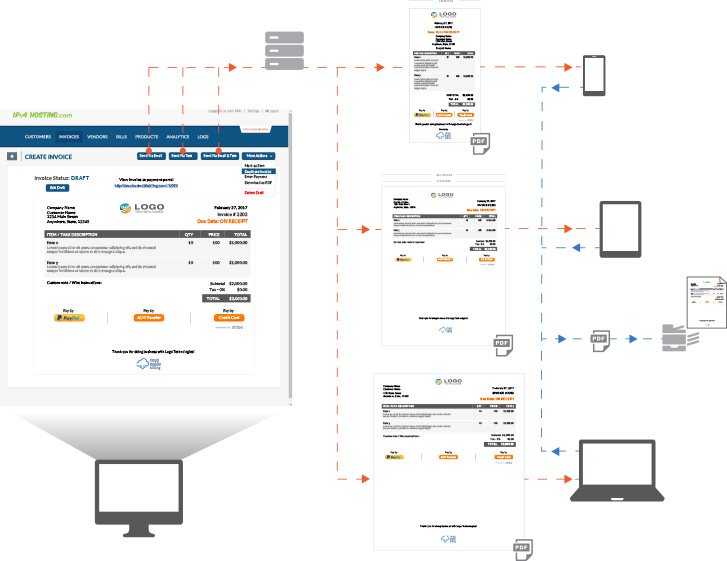
The responsive invoice design was also communicated in the diagram and was repurposed into a visual guide for development efforts.
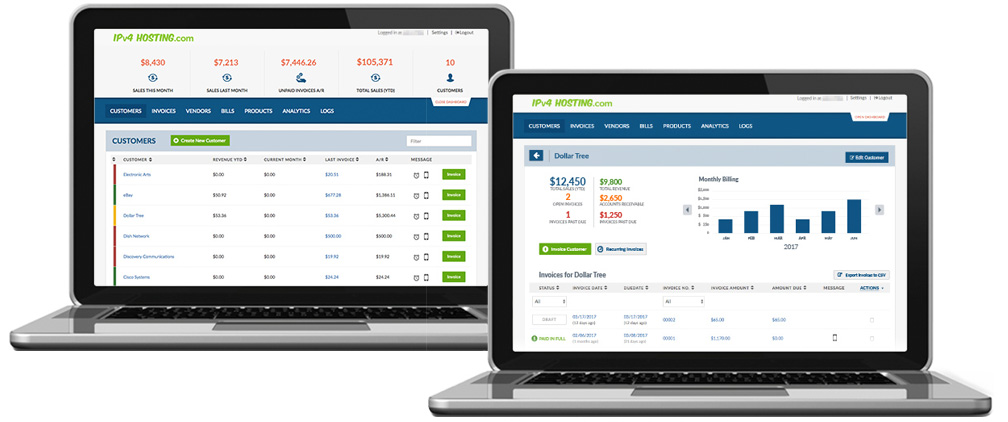
The “All Customers” view was also redesigned with a goal to guide the user’s eye towards important information through a quick read, concluding in a high-value actionable task.
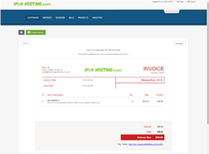
The individual “Customer” view was also re-designed to provide information at a glance. Thumbnails of these original screens were shown in "Testing and usability audit".
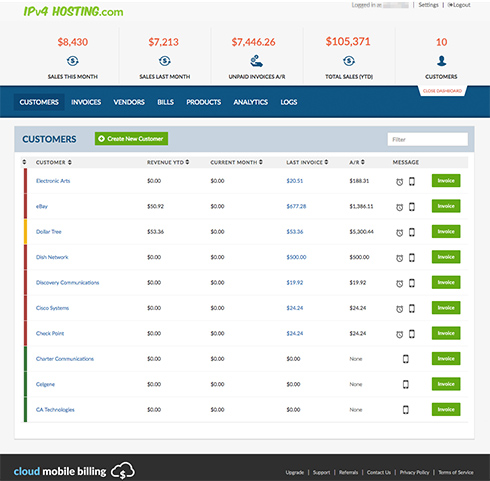
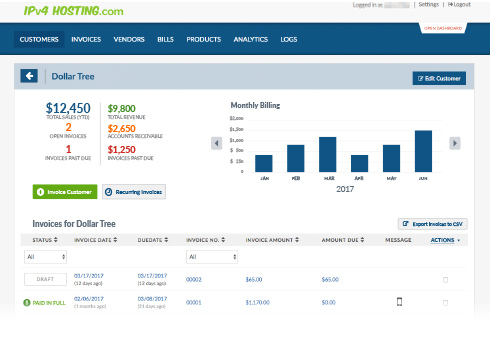
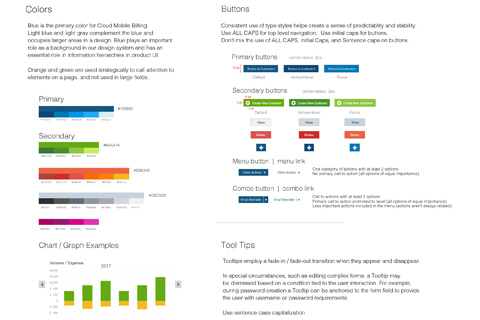
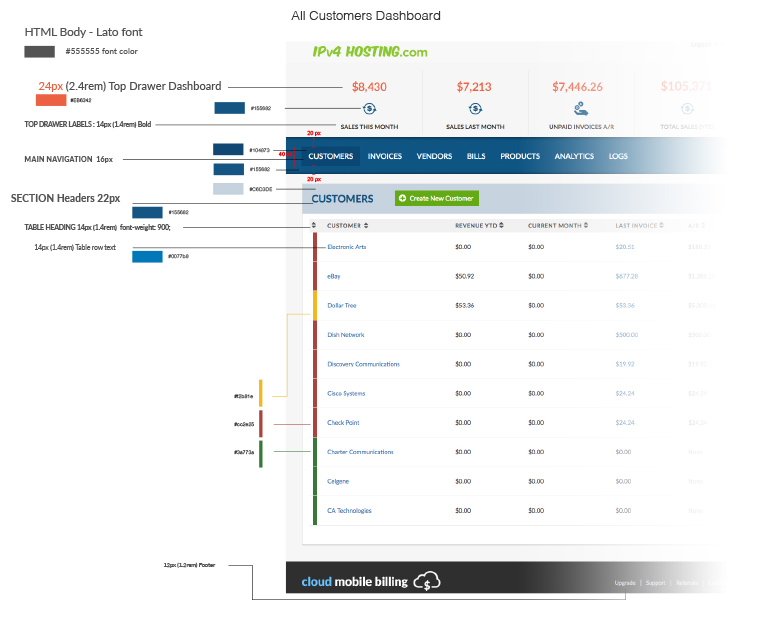
A design system was clearly needed and a styleguide to guide development efforts and design patterns. In it were included red-lines of key pages and navigation.
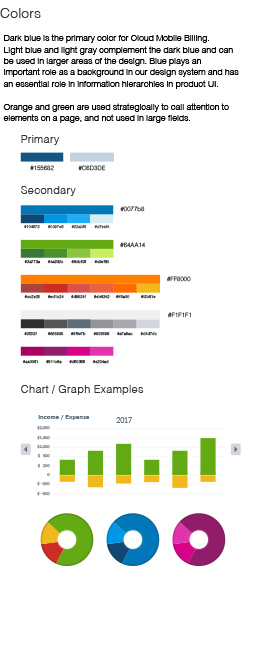
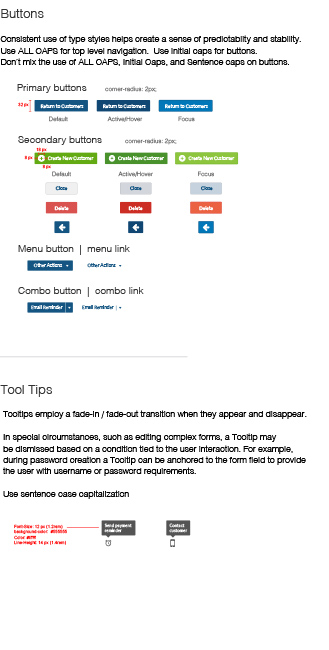
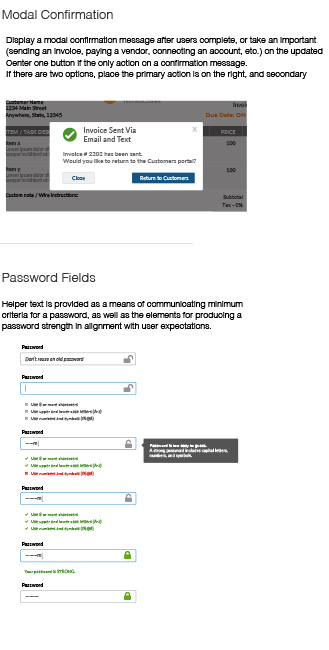
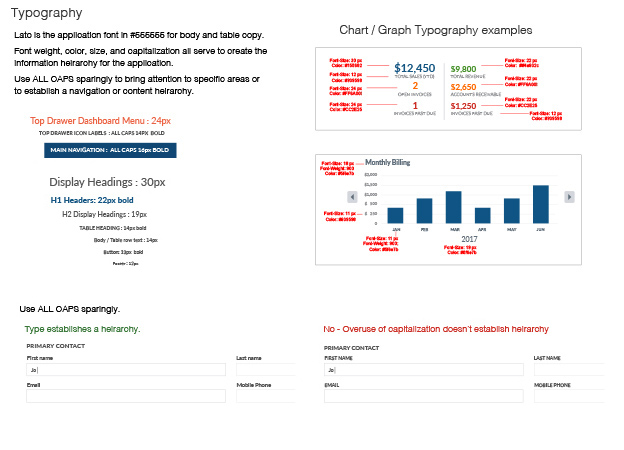
Coming up with a quick solution to meeting resistance around taking a step back to wireframe confusing sections, resulted in compromising a key component of UX — testing.
I now realize that I needed to state the case for wireframing the troubled sections a little more firmly, especially in the face of sunk costs and a rush to get to market.
The wireframe leads to early testing and eventually to prototypes that, again, lead to early testing of the product.
Without clear guidance on whether development efforts are meeting the expectations of the user, the only way to validate assumptions is through an expensive software build and testing live code. This gamble could be avoided by embracing the UX process and focusing more on initial design cycles with user-testing through prototypes.
Design a fiction writer’s app for creating the foundation for writing a story.
Non-tech-savy client. Design to accommodate the pairing of two separate but related blocks of information.
Clearly defined project scope so it could be accurately bid by developers.
The app’s purpose is to randomly, or interactively, generate a story framework to be referenced by writers over days, weeks or months as they develop the characters, plots, and character flaws.
Rough wireframe showing interactions for a complete flow.
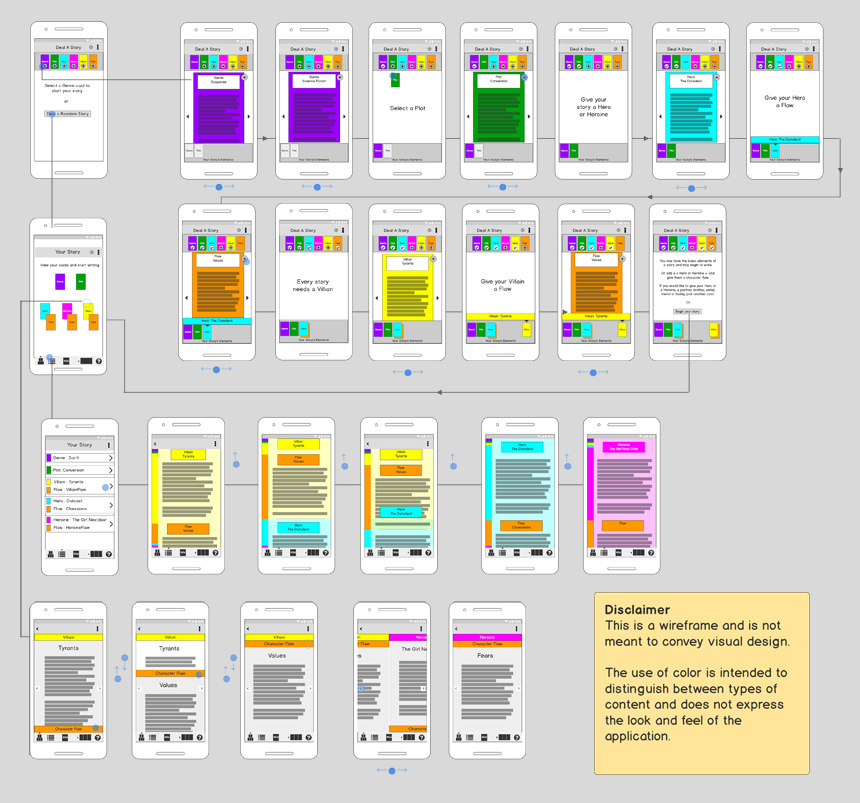
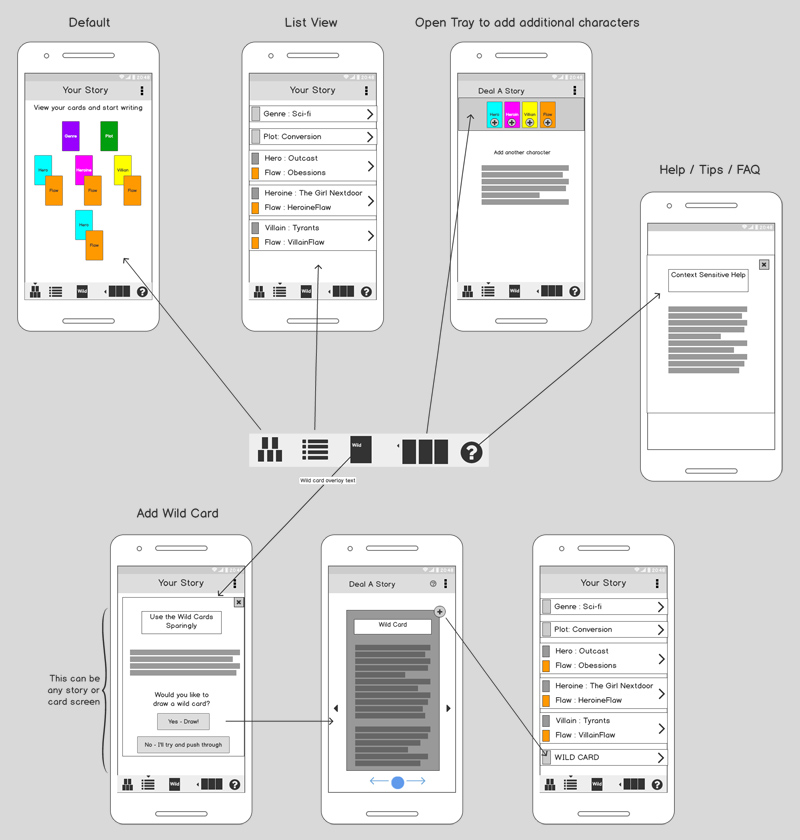
One of the project design challenges was the tight pairing of two separate elements of information — the characters and the character’s flaws.
For the 48 potential characters 16 different character flaws exist. The characters and flaws are intimately related, but separate pieces of information.
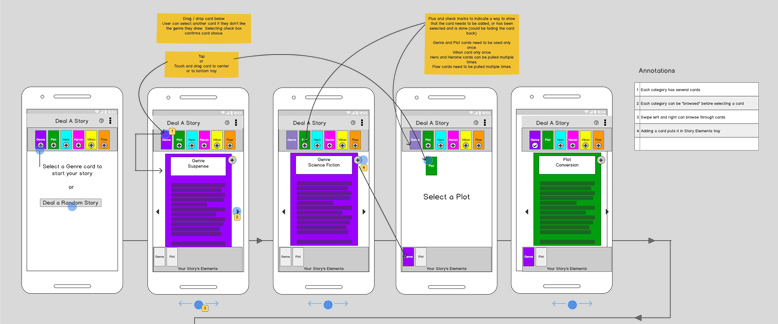
The UI needs to provide users an easy and intuitive way to create the character/flaw pairs and navigate between the 2 informational elements, as well as any other pairings.
From the ideas generated, three low-resolution interaction-design wireframes were presented, each with an accompanying animation to explain the interactions described by the wireframes.
Design pattern where content is paired through overlapping blocks that the user can drag up and down, or open and close with a button.
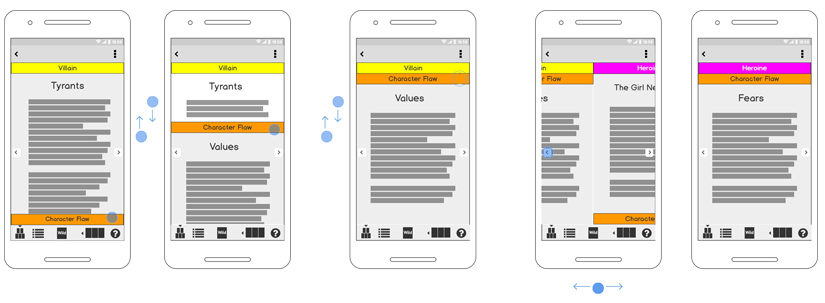
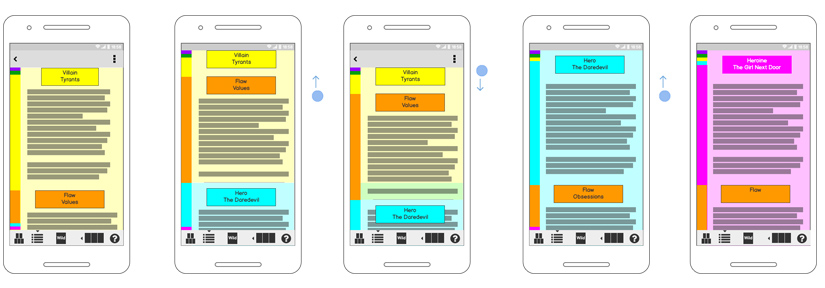
Design pattern where paired content resides with overlapping blocks that the user can drag up and down in a continuous vertical scroll. The color signifiers on the left indicate where particular pieces of information reside.
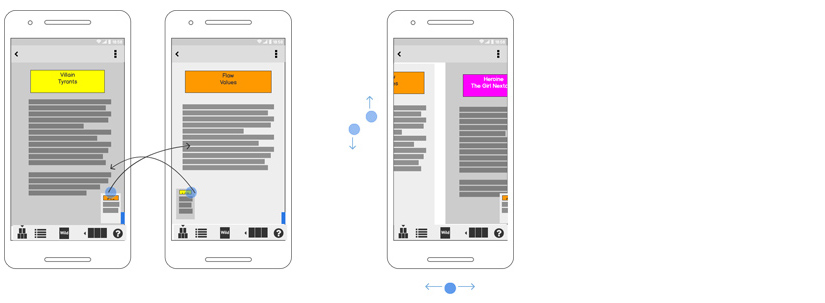
Design pattern where info is minimized into a thumbnail and a z-order switch occurs when the thumbnail is touched. Content pairs can be navigated swiping left to right or top to bottom.
The process of wireframing resulted in discovering requirements of the application that hadn't been initially apparent. It also helped to generate ideas about the interaction design. It was important to not present them all but to focus on the most promising, and also the most novel ideas, in order to guide informed decisions.
Presenting motion-based interaction studies effectively communicated ideas with product owners by allowing them to better visualize the ideas presented in the low-res wireframes. It also more clearly defined the scope of development efforts for the project.
Increase mobile subscriber loyalty, reduce "bill shock" and empower the mobile subscriber through notifications and active management of thier plan settings.
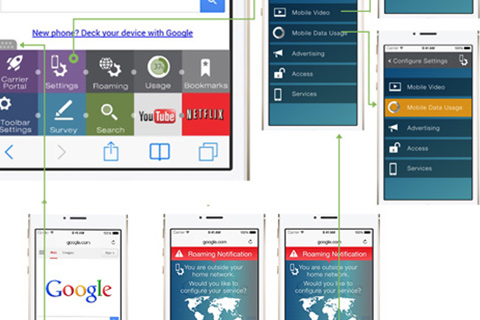
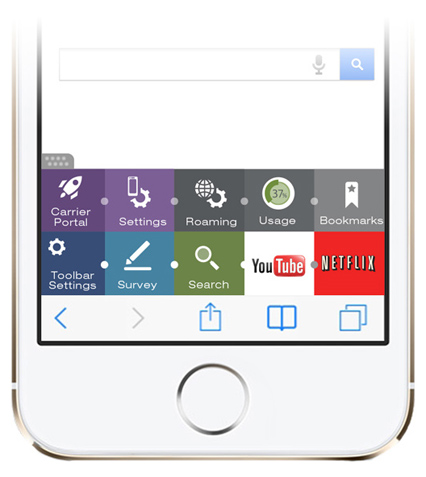
Design a mobile in-browser toolbar and rapidly prototype a user-journey for subscriber management of the user’s mobile data plan.
Enabled stakeholder's to present proof of concept and demonstrate a component of a solution suite designed for mobile network operators.
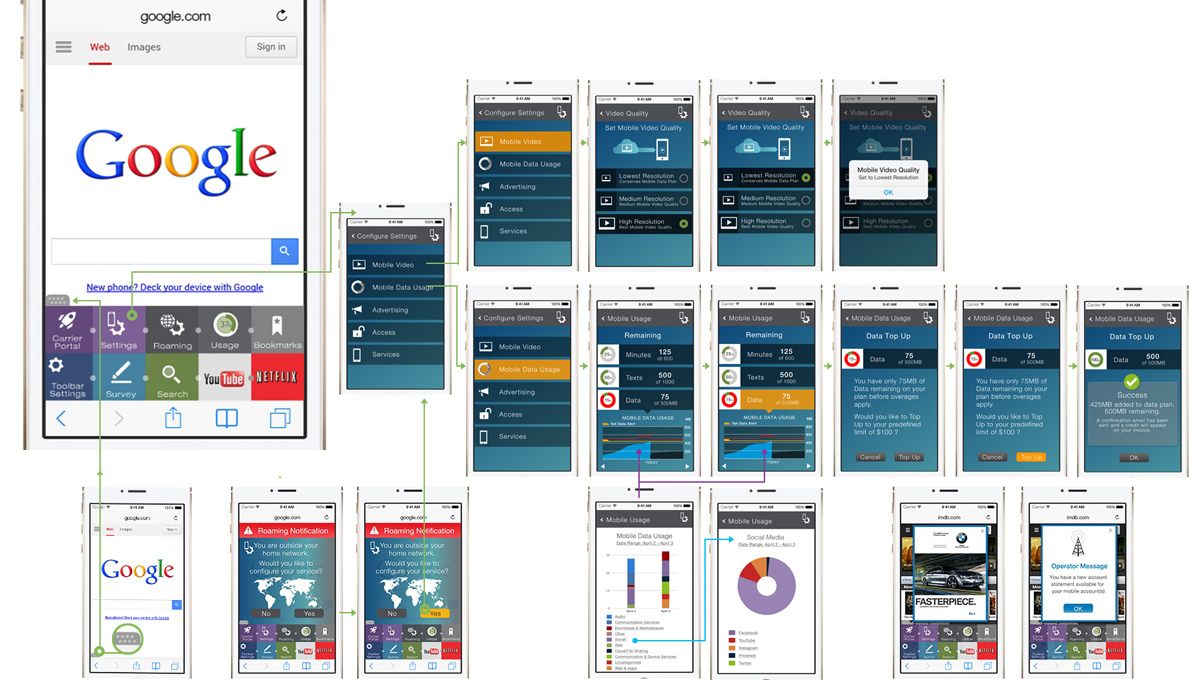
The low-res wireframe was essentially napkin sketches provided by the client. This high-resolution wireframe shows the user journey for changing mobile video resolution settings; topping off the mobile subscriber's data plan; and examining past data usage through reporting.
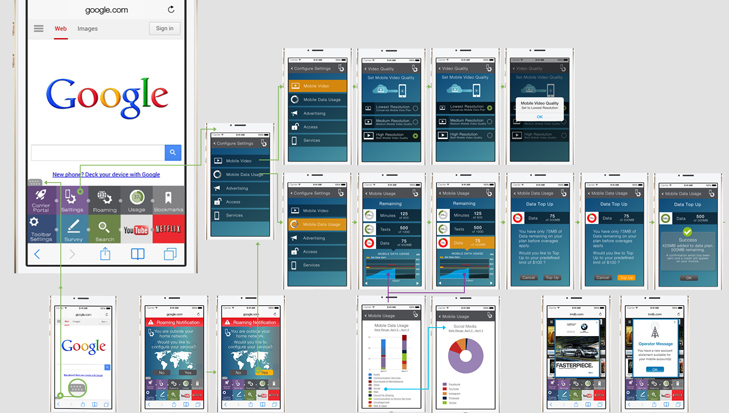
After completing the UI design and mapping out the interactions through a high-res wireframe, a rapid prototype was created in Invision. The Invision project uses animated gifs to demonstrate the pop-up nature of the toolbar.
Rapid design of an in-browser pop-up toolbar with access to user configuration of the subscriber's mobile plan as well as other user-configurable settings.
UI design of mobile reports, color palette and layout. The first view is of the different types of mobile data usage, and the second screen is a drill-down on "Social".
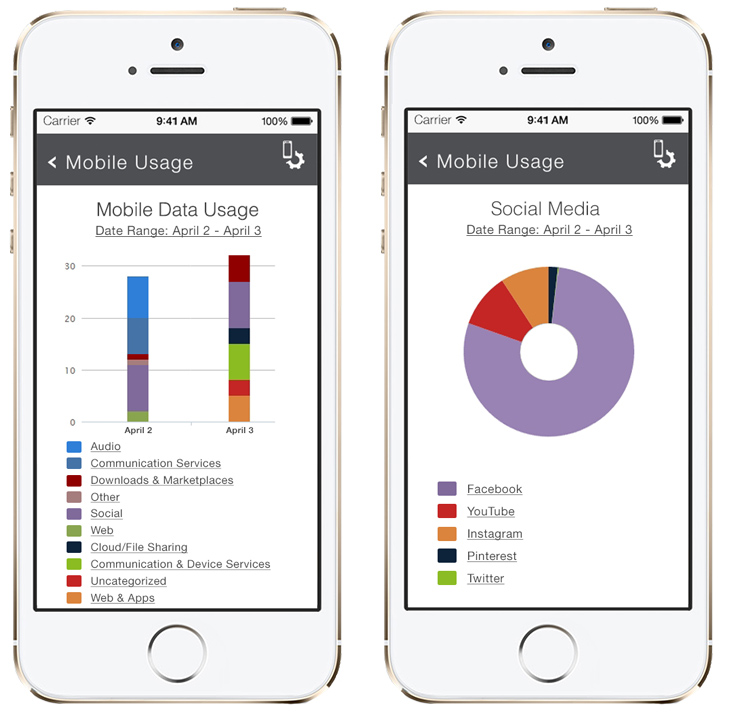
Rapidly designing and prototyping was essential for clearly conveying the product idea to potential clients and the internal development team. Having a concrete starting point for discussion shapes the development conversation.
The rapid growth of enterprise IoT devices results in network security vulnerabilities. Batch assigning security policies to multiple IoT devices and onboarding them to an enterprise’s network.
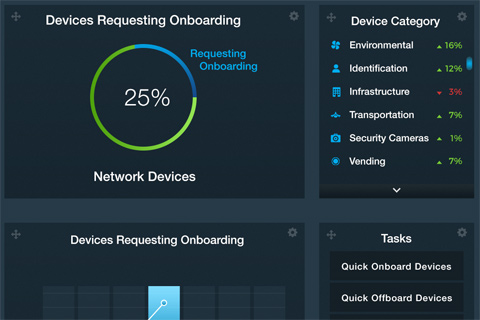
Design and prototype a secure enterprise IoT visual device management dashboard to establish proof of concept for extending proprietary security technology beyond individual devices and into the enterprise.
Presented stakeholders, investors, and potential new venture capital investors with proof of concept for an enterprise-scale secure IoT device onboarding and management dashboard.
This high-resolution wireframe shows the user journey for assigning security policies to a group of IoT devices and onboarding the devices onto the network.
The context for the enterprise application is an international airport. The assigning of the security policy takes place transparently to the user on the back-end.
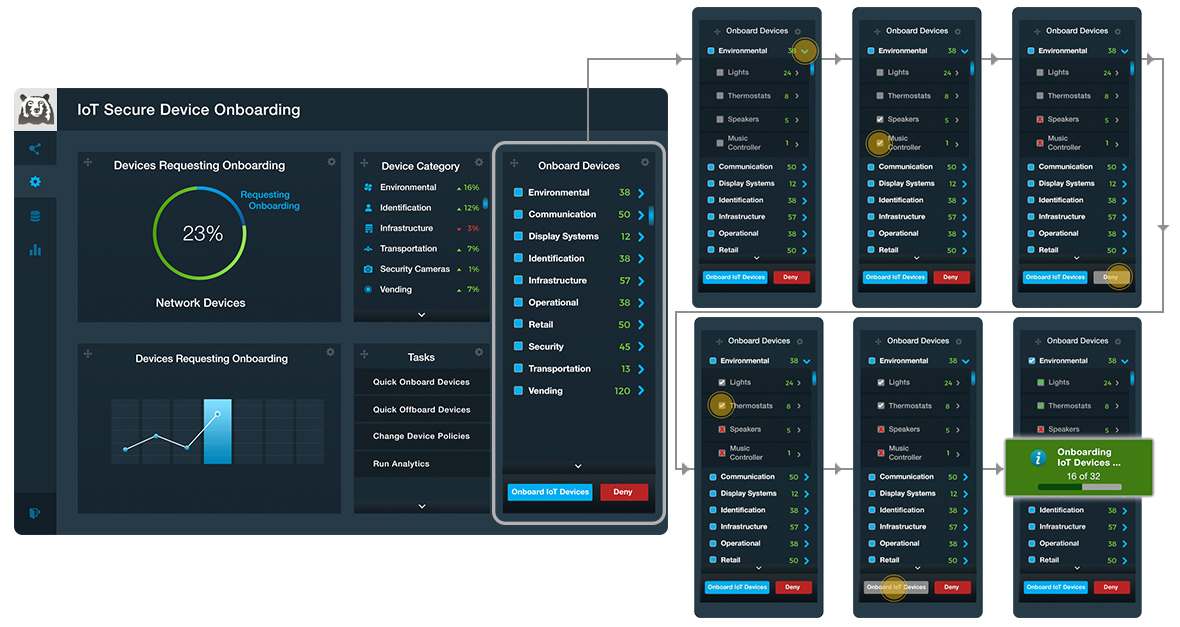
The design started with a pre-existing template and icons to save time and address budget constraints. If I wasn't able to find an icon or icon(s) didn't fit in the style then it was custom created.
In addition to prototyping the interactions from the wireframe above, the "node inspection" functionality below is a conceptual idea about how to navigate and manage a large set of networked IoT devices.
Rapidly designing and prototyping is essential for clearly conveying a product idea to potential clients and the internal development team. Having a concrete starting point for discussion shapes the development conversation.
I have served as an art-director, visual-designer, motion-designer, and creative project lead predominately for Marketing and Communications initiatives in the technology industry. My early career was as an interactive multimedia programmer and I have front end development experience. I’ve done work for some of the biggest companies in the world, for agencies, and for startups, delivering B2B and B2C initiatives across long- and short-term project cycles.
See examples of design work below.
I was the creative lead and responsible for all design work unless otherwise noted.

See examples of motion design work below.
Motion graphics is design heavy and requires a process-driven workflow.